.

Monday, June 22, 2009

Get Windows 7 Beta Now Official

Posted on/at 3:00 AM by Areez

Rumor is that Microsoft will release a beta version of new-generation operating system, Windows 7 at CES 2009 was correct. Steve Ballmer announced a few days ago in a speech opener CES 2009 that Windows 7 beta will be opened to the public on Friday and now you can get it from the official Microsoft site. This beta version is only available to 2.5 million by the first downloader Get the beta version as soon as possible.

This beta version is available in English (32-bit/64-bit), Germany (32-bit/64-bit), Japan (32-bit/64-bit), Arabic (32-bit/64-bit) and hindi (32-bit). After you download the file in ISO form, use the DVD application to create a bootable DVD to install Windows 7.

This beta version supports clean installation of Windows 7 and upgrade to Vista SP1 and Windows 7 is Windows 7 Ultimate edition. You will receive a beta serial for some time after registering your email. Minimum recommendations for operating the Microsoft Windows 7 is:

  • Processor: 1 GHz 32-bit or 64-bit processor
  • Memory: 1 GB of system memory
  • Hard drive: 16 GB of available disk space
  • Video card: Support for DirectX 9 graphics with 128MB memory (in order to enable Aero theme)
  • Drive: DVD-R/W drive
  • Internet connection (to download the Beta and get updates)
Visit Technet to download the beta of Windows 7.

When trouble to download ISO Windows 7 at the top of the page, DownloadSquad also find a link to download Windows 7 Beta Direct from Microsoft: read more…

Piracy Losses caused $ 1 to $ 5.5

Posted on/at 2:51 AM by Areez

Every dollar lost because of piracy resulted in losses of $ 5.5, Microsoft claims. The report issued by IDC to be funded by Microsoft describes how violations affect Copyright software ecosystem as a whole. IDC said if Microsoft get back every dollar lost, the company will get its partners to increase the income of $ 4.37 and reduce the operational cost of $ 1.13.

Pirated software can reduce the speed or even stop the sale of the project when illegal software is found. "The more severe, in developing countries where licensed software is still difficult to get, will be more difficult for partners to remain the official company operates," according to Microsoft.

IDC said that companies had to compete with other companies that use pirated software (to reduce the operational costs of the illegal way) and should also remove the time and energy dealing with clients who use pirated software. They are also more difficult to satisfy customers because they do not have the advanced features in software is not licensed.

"In a healthy eksosistem, illegal software causes hidden costs in the process of sales and development," said the director of the Microsoft License Compliance, Michael Beare. "In the worst scenario, the piracy will take the opportunity to damage the legitimate business to survive."

Microsoft in the report also said that most of the pirated software is "not intentional" and "smart companies that can assist clients with their software to clean install the programs more powerful. IDC also said how a number of Microsoft partners who use pirated software for discovery as an opportunity to gain trust from new customers.

According to IDC, a decrease in piracy levels of several percent can increase the income of the industry billions of dollars. Only one problem with this statement, and perhaps the entire report. This report uses statistics published the Business Software Alliance in recent years that this is a lot of accuracy.

Clik here for source article.
read more…

10 Software Most pirate in 2007

Posted on/at 2:42 AM by Areez

Software and Information Industry Association (SIIA) released the list of software that most of the hack-a report on the annual Anti-Piracy 2007. SIIA was founded by Ken Wasch in 1984 and now the head of the trade association for the software industry and digital content. This association has provided more than 800 software companies and IT companies with a global services in government relations, business development, corporate education, and protection of intellectual property.

A recent report said that the software the most in-hack comes from business category, the word processing software, office suits, web design software and other similar products. Here is the list:

The category
Productivity 34%
Operating System 23%
Document management 8%
Creative 7%
Security 6%
Utilities 6%
Development 4%
Database 3%
Media Management 3%
Server 2%
CAD 1%
Accounting 1%
Mapping 1%


10 Software in the rover for the year 2007:

1. Symantec Norton Anti-Virus
2. Adobe Acrobat
3. Symantec PC Anywhere
4. Adobe PhotoShop
5. Autodesk AutoCAD
6. Adobe Dreamweaver
7. Roxio Easy CD / DVD Creator
8. Ipswitch WS_FTP
9. Roxio Toast Titanium
10. Nero Ultra Edition

The problems found in the largest piracy sites online auction. SIIA research shows that at least 90% of software sold on eBay is pirated applications. And below is a list of applications with the highest level of piracy on the World Wide Web:

1. Adobe Photoshop
2. Adobe Acrobat
3. Adobe Creative Suite
4. McAfee VirusScan
5. McAfee Internet Security Suite
6. Symantec Norton Anti-Virus
7. Symantec Norton pcAnywhere
8. Symantec Norton Ghost

Strangely, Microsoft Office that I think is one of the most frequently dibajak not in the lists above.


Click here for source article.

Update: turns out Microsoft applications do not appear on the lists at the top because they were not Clien SIIA.
read more…

5 Applications Creator CD / DVD

Posted on/at 2:30 AM by Areez

In addition to the information center and entertainment, the Internet is also a media which is very easy for us to share data with friends, family and colleagues. But it does not mean the CD and DVD have become a part of the past. How much empty sekeping CD? CD / DVD can also be used anywhere. In addition, almost all media writers CD / DVD is available now only require a very time to write a strip. Moreover, if supported with the appropriate application. Below, there are 5 applications that become favorites of the visitors Lifehacker. Let us study one by one.

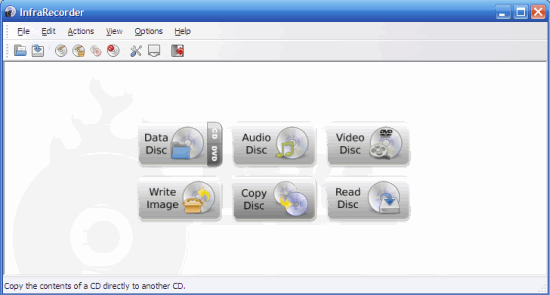
InfraRecorder (Windows)


InfraRecorder (IR) is an application writers CD / DVD to open-source Windows. IR can meet almost all needs including optically write content to a CD / DVD, copy CD / DVD, create audio CDs, video write, delete the content CD / DVD, and others. In addition, the IR memory needed is also very small. IR is also available in portable versions that you can take it on the USB.

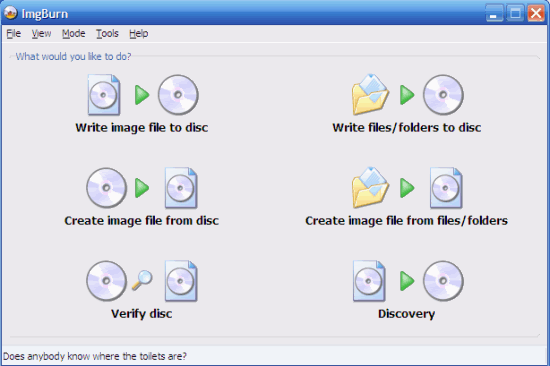
ImgBurn (Windows/Linux)

ImgBurn (IB) can be assumptive as a Swiss knife versatile. IB can write data to and from various formats such as CD audio, ISO, DVD video, and even HD-DVD and Blu-ray. In addition to IB can also change the image into a CD. IB is very fast, easy to use and does not require any fees sepeser. This application is still actively developed by a team that created the application that DVD Decrypter is very popular.

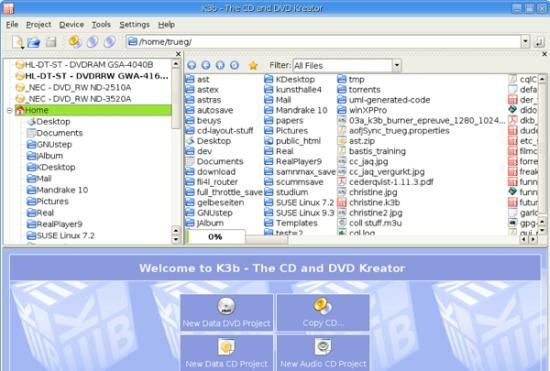
K3b (Linux)


K3b (which is the abbreviation of KDEBurn Baby Burn) is an open-source application for Linux. Just like other applications, K3b provides functions such as standard CD audio, data, image and copy the CD / DVD. For film lovers, even to me K3b-DVD rip to your hard drive (HD) in a format DivX or Xvid. If you use the operating system Linux, K3b really is the application of optically most popular.

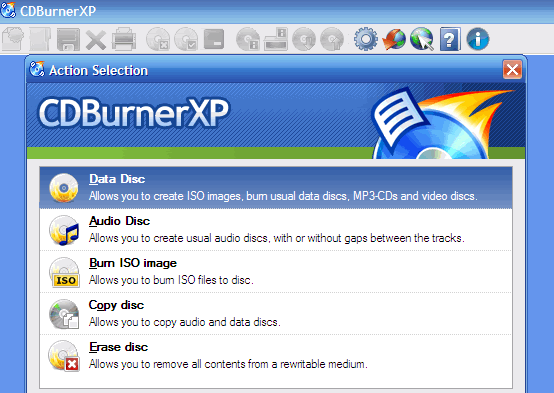
CDBurnerXP (Windows)

CDBurnerXP (CDBXP) merupakan perangkat lunak gratis khusus untuk Windows. Walaupun namanya menggunakan istilah "XP", aplikasi ini tetap bisa bekerja pada Vista, 2000, 2003 server dan XP sendiri. Bukan hanya CD/DVD, CDBXP juga memungkinkan untuk HD DVD dan Blu-ray. Sedikit banyak, fiturnya mirip dengan ImgBurn, tetapi membutuhkan .NET Framework 3.5.

Nero (Windows/Linux)

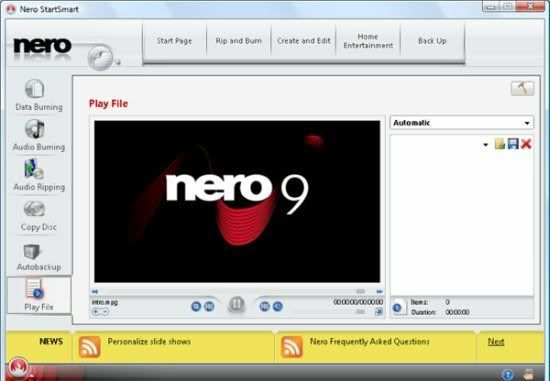
Nero 9 is probably one the most we know(and one of the most applications in the pirate). Many critics complained about the latest Nero and large (370MB for downloadable, requires 2GB of hard disk installation and for a long time).

But the fans berargumen that the user can actually install the parts they need, so it does not need the capacity that is too large. Nero 9 is a shareware for U.S. $ 80 (free trials here) and specifically for Windows (requires. NET 3.0). Linux users can try Nero Linux worth U.S. $ 25.

Nero burning ROM


Ok, which is your favorite? Or still have another opinion? Please utarakan freely in the comments below.

BurnAware Free

read more…

Microsoft Offer Free Upgrade to Windows 7

Posted on/at 2:26 AM by Areez

For users who want to replace their Windows Vista with Windows 7, Microsoft will offer Windows 7 Update Program. All systems purchased since 1 July 2009 will be allowed to upgrade to Windows 7 with no additional cost. But not all licensed owners of Windows have the right upgrades this. In addition to have to buy a PC after a specified date, there are three conditions that must be observed:

* User must purchase a new PC that resemble Windows Vista. Windows Vista customers who purchased separately and do not get the right upgrade for free
* Only Windows Vista Home Premium, Business and Ultimate are entitled to upgrade free
* Computers must have purchased a Certificate of Authenticity (COA)

There is one more very important thing, Microsoft does not require a PC to vendors participated in this program. Therefore if you want to make sure you are allowed to change to Vista when Windows 7 is released, you should first find out whether your PC vendor to support this program.(DownloadSquad)

read more…

Prepare Microsoft SkyBox, Skyline & SkyMarket

Posted on/at 2:12 AM by Areez

Microsoft plans to announce three new mobile services in the Mobile World Congress (MWC) in Barcelona next month. Company manufacturer of the world's largest software will also follow the trends of web 2.0, move the data to your mobile service cloud and compete Apple MobileMe property.
In October Microsoft announced a year ago cloud computing platform Windows Azure at Professional Developers Coference bid and will expand the software + services with some of its new products. According to sources close to Microsoft, the company is developing products with the code name SkyBox, Skyline and SkyMarket. Suspected after finished third this product will be marketed under the brand Windows Live.

Instructions on dibuatnya SkyMarket first found in September 2008 when using some Microsoft job to develop products similar to the AppStore for the iPhone. SkyMarket is the code for a place to sell / distribute mobile applications to rival Apple and AppStore BlackBerry Application Center. SkyMarket only available for Windows Mobile-based phone and will be distributing thousands of Windows Mobile applications that are available today.

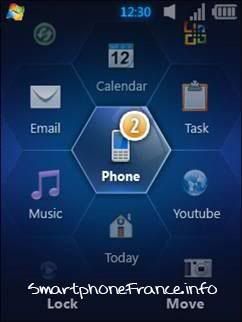
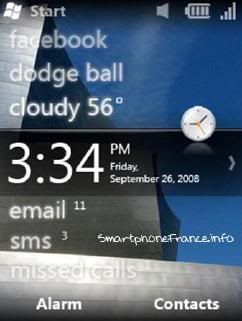
Microsoft also predicted akan shows Windows Mobile 6.5 in the MWC. NeoWin said that this latest version is tested by the manufacturer of the smart phone and will be released in the first quarter 2009.


Screenshot Windows Mobile 6.5


SkyBox is a service to synchronize information from mobile to web. Microsoft will offer automatic backup and restore, access and data management easier for mobile phone users to simultaneously share information with other users. This service will enable synchronization contact, email / SMS, calendar, and photos to the cloud, similar to what is already offered MobileMe. The main difference from the service with MobileMe is Microsoft does not limit this service only on the tools of Windows Mobile-based course.

Skyline will be targeted to small companies. Offers functionality similar to the SkyBox, the company will also be able to configure their mobile phone for use with Exchange hosting service with their own domain. (Neowin, gambar diambil from here) read more…

Prepare the Distribution System Microsoft Applications for Windows

Posted on/at 2:10 AM by Areez

Aplikasi Programs and Features di VistaHave you ever questioned the decision to change the name of Microsoft applications "Add / Remove Programs" in Windows XP and previous to "Programs and Features" in Vista? There are likely to consider Microsoft the package management system similar to the various Linux distro (eg, APT in Debian, RPM in Red Hat). System such akan merevolusioner how users interact with Windows applications, while providing some form of security because the benefit only to allow the user to install applications that are secure.

For you who have not been so familiar with the package management system, the system allows users to search, download and install the update applications easily, without having to visit the various Internet site to download the application sought.

Microsoft recently ask the beta testers of Windows 7, to request input from them about the "single place to find and update management for the programs in the PC." The participants are asked to indicate (1 - 9) the importance of the features below for them:

  • The ability to install a program on my PC.
  • The ability to find the program I want to use on my PC.
  • The ability to have all programs on my PC up-to-date.
  • The ability for me to update specific programs on my PC at a time that is convenient for me.
  • The ability for me to remove a specific program on my PC.
  • The ability to set the schedule for updating programs on my PC.
  • The ability for a program to automatically configure settings it needs while it is being installed on my PC (e.g. there is no need for me to manually configure the firewall, etc).
  • The ability to block a program from being installed on my PC when the program publisher cannot be verified.
  • The ability to ensure that only programs on my PC from publishers I choose to trust can automatically stay up-to-date.
  • The ability to install programs on my PC from program publishers I trust, without any security prompts or warnings.
  • The ability to see security prompts or warnings when trying to install programs from publishers I had not previously chosen to trust.
  • The ability to install a program so that all the users sharing a PC can use it.
  • The ability to install a program and have it usable almost immediately.
  • The ability to install multiple programs on my PC at the same time.
  • The ability to install programs without causing any noticeable slow-down to other programs on the PC.
  • The ability to install a program without interrupting other activities I am doing on my PC.
  • The ability to know that my PC has all the necessary requirements a program needs before installing the program (e.g. memory, hard disk space).
  • The ability to know the identity of the company or vendor that created a program installed on my PC.
  • The ability to find reviews and ratings about a program before installing it on my PC.
  • The ability to quickly find the programs I use most frequently on my PC.
  • The ability install or update a program without the need for a reboot.
  • The ability to have a single place for finding and managing updates for the programs on my PC.
  • The ability to know which programs are causing problems on my PC.
  • The ability to restore a program to its original settings and behavior when it malfunctions.
  • The ability to install a program to a USB key.
  • The ability to discover which programs can be installed.
  • The ability to discover which programs can be removed.
  • The ability to discover the repair functionality for a malfunctioning program.
In short, Microsoft would like to know what features are desired user from a Windows application distribution system. The world's largest technology companies this seems to be working hard with many third-party developers to design this system well, but when this system is able to achieve functionality similar to the Debian APT system of course this will be the big breakthrough. Who does not want the feature to search for the application locally on the PC, the Internet, download, install, update all the applications from one application only? Maybe this system will be finished when Windows arrived 8 (or whatever the name of the Windows OS 7). read more…

Will Microsoft IE8 Browser Being?

Posted on/at 1:58 AM by Areez

According to Randall Kennedy from InfoWorld, IE8 likely to be the latest version of Internet Explorer browser. It seems Microsoft is preparing to wave the white flag in the Trident engine used in IE forever. So what product will replace the IE?

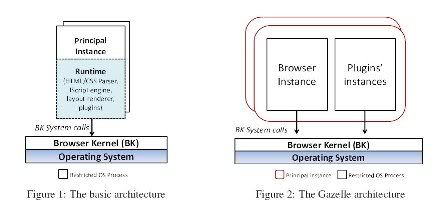
Kennedy said that he heard some speculation, the first engine is WebKit which sponsored the development and role models has become a standard part of the non-IE browser and Firefox. Then there is also a stronghold which insists that the idea to use the WebKit browser is the next Microsoft deceive and that Microsoft will adopt a new engine created a research division of Microsoft. This new engine, called the Gazelle we have discussed previously, browser with a high level of security.

But do not care about any alternative that Microsoft used, they must support IE and ActiveX for a long period of time, because many companies are developing products based on these two applications. For most internet users such as us, it is just an ActiveX plugin Ria (rich internet application), which is frustrating have been replaced by Ajax or Flash. However, for various corporate use many Microsoft products, ActiveX is a technology that is quite important for web based applications.

Then again there are problems such as support for web technologies HTML / CSS, one of the aspects in which the failure of IE. If Microsoft chooses to use its own rendering engine, all of us can only hope that the engine will comply with web standards, not products, such as IE frequently garbled display in the site-based CSS.
read more…

Microsoft Gazelle: New Browser Modern architecture

Posted on/at 1:50 AM by Areez

Logo Microsoft ResearchStarting from a browser application that the user to visit a static page site. Along with the internet berevolusinya be a dynamic place, the browser seems to be an operating system that rogue use the same resources for a variety of sites that do not trust each other (each site is called "principal"). Currently, there is no browser in the world, including berarsitektur new browser such as IE8 and Google Chrome has a multi-principal architecture.

The main purpose of the Gazelle is to create a browser with high security level to explore the application web-based applications all over the internet. At its core, "Gazelle trying to make the browser into the operating system more secure with the principal (the site) from one another with a separate power source that is used in the domain to their own. All information exchange between the two principle must be conducted through the channel dijembatani by the browser kernel. "
Arsitektur Sekuriti Gazelle


For the technical you might think "notGoogle Chrome all have separate power source to the site in the process of each?" Chrome architecture with the architecture introduced in the Gazelle has two major differences:
1. Chrome all the sites / applications with the same domain as the principal and so for example, mail.google.com docs.google.com akan considered as one unit. Gazelle assume two different applications of this as their principal.
2. When a site, for example igoogle.com embed content from other sites, such as for example content from youtube.com in an iframe, Chrome will put them to a principal in the same. Not so much as with the Gazelle

Microsoft research team said that the prototype has been successfully Gazelle 19 of the 20 most popular sites according to Alexa statistics, but acknowledge that the prototype performance is only "so-so." Reports published in a research team
also describe the security architecture Gazelle comparison with some other browser. If interested in the browser and security technologies, research is quite interesting to read
.
read more…

5 Netbook Having the Internal 3G Modem

Posted on/at 1:41 AM by Areez

So many models netbook which is now circulating in the market require that the vendor-vendor computers to provide new features that provide added value to the user.

Therefore, some netbook begin to integrate modem 3G features in their pledge. Now internal 3G modem is no longer owned by the notebook-notebook premium cost dozens or even tens of millions, but netbook-netbook Rp 5 million-an.

Here are some of the netbook has a 3G modem internal.
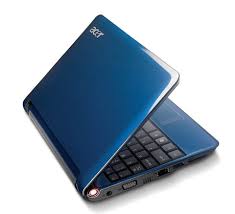


Acer Aspire One 3G (Aspire One AOD 250)

Netbook 10-inch this diotaki by Intel Atom N280 processor speed 1.66 GHz (667 MHz FSB, 512 KB L2 cache), Intel 945 chipset with GSE Express, DDR2 memory capacity of 1 GB, storage shed with hard disk drives of 160 GB.

Netbook is also equipped with multiple in - 1 card reader, Bluetooth 2.0 connectivity, and the 6 cell battery. It was sold for Rp 5.99 million, with operating system Windows XP Home Service Pack 3, Kaspersky antivirus, IM2 starter pack, a packet softcase, and SDHC memory cards of 4 GB.

If you are lucky, you may still get the cashback program to Rp 500 thousand from Acer given the limited during the exhibition.
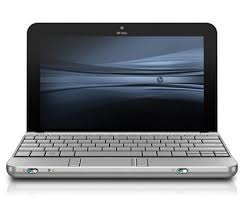


HP Mini 3G (Mini 1017)

HP Mini 3G sold cheaper than 3G Aspire One, which is the price of Rp 5.5 million. However, the 10-inch netbook has a few shortfalls compared with the Aspire One, namely the processor, and storage capacity that is smaller.

Prosesornya is the Intel Atom N270, with a speed of 1.6 GHz (533 MHz FSB, 512 KB L2 cache). In addition, hard disk capacity is only 60 GB (PATA), and not to provide Bluetooth connectivity. HP Mini 3G has dibundel with Windows XP Home.


Dell Mini 3,5G

Compared with the netbook-netbook above, Dell offers the Mini data connection faster section, it has a 3.5 G internal modem. Theoretically 3.5 G technology may be able to transfer data about nine times faster than 3G technology.

Netbook uses Intel Atom N270 for prosesornya, with RAM of 1 GB DDR2, chipset Intel Graphics Media Accelerator 950, and the media storage of Solid State Disk 8 GB. However, Dell also provides SATA hard disk drives of 160 GB external.

He is also equipped with WiFi connectivity, Bluetooth, web camera and internal. Cheaper price of Aspire One HP Mini 3g and 3g, which is only Rp 5 million.
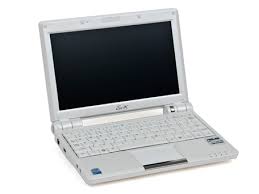


Netbook Smart Telecom (Olive X107)

This is a bundle package netbook Smart Telecom launched two days before the exhibition opened Festival Komputer Indonesia.

On this package offers Smart netbook Olive berprosesor the X107 Intel Atom N270-speed 1.6 GHz, DDR2 1GB memory, and storage capacity of hard disk drive of 160GB.

Netbook screen size is 10.2 inches berdimensi 265 x 185 x 25 millimeter, has a weight of 1.2 kg, and 1.3 megapixel web camera. For connectivity issues, this netbook features provide Wi-Fi and USB base 3.

And more important, dibundel a netbook with Windows XP Home Edition, it has a modem CDMA 2000 1X EVDO Rev A 1900MHz integrated. Smart offers two subscription options, ie, post-pay and prepay.

For post-pay, the customer is charged Rp 499 thousand per month for 12 months, and get a free 12 month unlimited internet. To prepay, netbook sold at Rp 4.7 million, with unlimited internet for 30 days. Both service options will be a maximum-speed Internet service to 3.1 Mbps download, and 384kbps for upload.

Elevo 3G

Netbook Elevo is still less popular because the brand is not much heard. However, at least, it includes tools for business provides internal 3G modem.

With the price of Rp 5.688 million, 1.2 kg netbook uses Intel Atom N270 processor, 2 GB RAM memory and hard disk of 160 GB.
Not only provide internal 3G modem, netbook with 6 cell battery also provides WiFi connection. read more…

Make Vista Sidebar Gadget, Windows 7 and OS X

Posted on/at 1:19 AM by Areez


Are you a user operating system Windows Vista or Mac OS X that bored look in the desktop sidebar gadget that and only that? Gadgets that you can select and use limited? How to create a gadget that you want to appear in the sidebar? Now you can make it very easy with a free application called Amnesty Generator. With this application you will easy change in a variety of widgets, and video game designed to be placed on web pages, blogs, social networks in the form of a gadget and then you can freely place the sidebar on the desktop, such as flash game, video, Youtube, lists of music playlist imeem or LastFM and many more.


You do not need technical ability to create gadgets with this application. Simply copy and paste the embed code from the HTML web widget that you find in the application and click generate.


For example you can find a list of gadgets from the gadget, such as service provider iGoogle, The New York Times, SpringWidgets, Widgetbox and other leading sites widget. Go to site and search widget you want, then click on the link Get Widget code if not already visible, and copy the code from the html embed code in the box provided. Amnesty Generator application and paste the code before, do not forget to give your name, set to appear when the size and kind of give a thumbnail image if needed. Click the button and generate the conversion process with a fast you can immediately see the results.

Because this application does not support Vista and wonder if this application can also be used to create a widget in Windows 7. Amnesty Generator supports Windows Vista and Windows 7 32 bit and 64 bit, and a version for Mac OS X is also available.
(JKWebTalks and DownloadSquad) read more…

The Windows 7 with XP Mode

Posted on/at 12:59 AM by Areez

Windows XP operating system may be the best that have been owned by Microsoft. Even after Vista is made to replace the XP that does not appear to make a request to the operating system is the ebb. Some of the users and vendors to do their own protest and urged Microsoft to sell licenses to stay and extend support to the operating system is longer. Fortunately Microsoft is willing menyanggupi charges. The facts are talking XP more lightweight, stable and compatible with more devices than Vista.

Microsoft is aware of the many users with XP than Vista, then they throw a unique strategy for menggaet faithful XP users that want to use their latest operating systems, namely Windows 7 to include a feature called XP mode.

Features sebelummnya called Virtual Windows XP this is a virtual environment designed so that users of Windows 7 can run smoothly with applications that have previously run on Windows XP. Version of Windows XP that is used is equipped with SP 3 which was the last update on this operating system. Virtual PC technology that drives into the ability virtualisasinya, Microsoft purchased the technology from Connectix company in 2003.

Unlike other virtualization solutions, virtual environment does not separate with a special window, can run applications that integrates directly with Windows 7. You can see in the screenshot below how the Word 2003 application, which should only be run on the Windows XP version of the maximum, can be run side by side in one place with the Word 2007 environment in Windows 7.

By adding features that are associated with the compatibility problem is the lack of Microsoft would like to improve on the previous Vista, where compatibility problems arise with the application that is designed for operating systems XP and older version other.

Microsoft's Scott Woodgate said through blogs, "Windwos XP mode is designed specifically to help companies / small businesses to switch to Windows 7." Then it is said also, "Windows XP-Mode provides the flexibility to run many applications that have been productive in the old PC-based Windows 7"

Which is unfortunate dibatasinya use XP mode only on this edition of Windows 7 Professional, Enterprise and Ultimate only. And itupun you must first download the application for free.

Microsoft says party will soon release a beta version of Windows XP and Windows Mode Virtual PC 7 for Windows Professional and Windows 7 Ultimate.

Some screenshots taken from the site WinSuperSite.com show how this mode XP installed and how the settings in Win7 and tested with a try to install and run Office 2003 applications. And later you will see how apliaksi running Office 2003 with Office 2007 simultaneously in one screen that shows the singularity of this virtualization technique.

Virtual Windows XP Installation.jpg


Virtual Windows XP Setup.jpg


Virtual Windows XP Setting Up.jpg


Virtual Windows XP Window.jpg


Virtual Windows XP Action.jpg


Virtual Windows XP USB.jpg


Virtual Windows XP Tools.jpg


Virtual Windows XP Settings 1.jpg


Virtual Windows XP Settings 2.jpg


Virtual Windows XP Office 2003.jpg


Virtual Windows XP Office 2003 2007.jpg


Virtual Windows XP Start Menu.jpg


What do you think about the special features in this Windwos 7? What future for the benefit of the users of Windows 7?
read more…

5 The Application Speed USB Flash Disk

Posted on/at 12:39 AM by Areez

USB Flash Disk Icon.pngFor consumers to get a product that has a maximum performance with a reasonable price or if semurah can be a very exciting thing. Begitupun time to buy one of the electronic products that one is, the flash disk. At least each time the exhibition was held computer, is always pretty good out of stock. A very cheap price may be a strong reason, but if it just cheap? In choosing Flash disk can be purchased that will appear some criteria be considered, such as capacity, price, brand, appearance, security features and speed. If the last reason to become one of the benchmarks before you make the purchase Flash Disk seems to be difficult, unless you are ready with the options that need to cost more.

Most of the Flash Disk is now using a USB 2.0 connector type that was first issued in April 2000, where the maximum speed of this version of the data transfer is 480 Mbps / 60 MBps who is also known as Hi-Speed USB. Compared with the USB 1.1 maximum of only 12 Mbps, the speed is superior to 40 times. Previous initial speed USB 2.0 is 240 Mbps, but then, in October 1999 by a group promoter improved USB speed. But in practice in the field, the speed is very difficult to achieve, can only be effective up to 320 Mbps / 40 MBps.


Specifications speed flash disk that can be shown not accurate. To think it's the speed of your USB Flash Disk which you can buy with one of the five following a free application that not only undertake speed (read and write), but also can check other things related to the Flash Disk. How lucky can you get a USB flash disk product cheaper rousing but performing optimally.

Check Flash


Check Flash.png


Lightweight applications that are only 340 KB size of this home was created by a programmer named Misha Ukraine. Although small, but the tool is able to do the job well, to know the speed of data transfer, to check if there is an error in the flash disk, and format.

Check Flash akan undertake to run the simulation process read and write repeatedly on the flash disk, so it will then display the data transfer speeds as well as to detect any errors that occur during the process. This application you can simply run the installation process without the first and only consume memory of 812 KB.

HD Speed


HD Speed.png


If the previous application hanay can work in the form of flash storage, an application called HD Speed can measure speed of data transfer on storage media such as hard disk and CD / DVD-ROM, floppy disk, and flash card. So, this application supports the data storage format NTFS and FAT on the operating system WinNT4, Win2000, WinXP, Win2003, and WinVista.

Application with a file size of 80 KB is not need to install and you can run, and then select the media you want to save the check and click Start. Results from the process of reading and writing that will be recorded in the form of a graph is displayed and also the value of speed at that time and the average unit that can be changed with the number of fox-error if found.

Crystal Disk Mark


Crystal Disk Mark.png


Crystal Disk Mark is a tool that allows you to make the comparison speed read and write on a variety of media including USB Flash store Drive. Looks simple and easy for users to be able to understand about the type of test conducted.

The types of tests that can be done with this application as the process read and write in some of the stage or the process of read and write random 4KB / 512KB, and the process of copying text. Test results shown in the form of a large number in MB / s and the progress bar as the backdrop. Size of 396KB This application is portable and is compatible with Windows and 7/2008/Vista/2003/XP/2000/NT4/Me/98 for 64-bit version for the Windows operating system Vista/2003/XP.

Flash Memory Toolkit


Flash Memory Toolkit.png


In accordance with the name Flash Memory Toolkit is a package tool for Flash-based storage. Some of the tools available including the option to get detailed information about the device such as device capacity, file system, operating system and device settings. This application is also able to securely delete files as well as restore it after the format, and is able to detect the fault / damage in the device. Interestingly there are also backup and restore functions can be run simultaneously with the process of testing the performance of read and write from flash.

Unfortunately for the standard version is provided free of charge only able to display a speed reading course, and if you want to know the speed of calculation as well as read write, then be required to upgrade to Pro version. However the ability to calculate the speed of reading the device file with the benchmark of features that appear in the form of a comparison chart it is already very helpful. This application must be installed first to be able to use the file size of 766KB can be used in Windows 2000, XP, XP 64-bit, Server 2003 and Vista.

HD Tune


HD Tune.png


Applications HD Tune is not much different with the previous application that comes in two versions, namely a free and paid. And again in the free version of the application can only perform the calculation speed to read a variety of storage devices with the SCSI interface, SATA, IDE also includes USB. This application provides detailed information about the device and the ability to detect the damage / error is.

HD Tune benchmark tool is very useful even though the free version beebrapa features have been reduced compared to the paid version. In the free version you will be given information about the speed reading benchmark maximum, minimum and average time with the same access, burst rate, the highest speed that can be achieved when the data can be sent from the storage device to the operating system. HD Tune which currently has reached version 2.55 is available for Windows 2000, Windows XP, Windows 2003 Server and Windows Vista.

Hopefully the applications above can be useful to do with the vagi-speed USB Flash Disk from it, and let us know if there are other applications that you know through the comment box. read more…